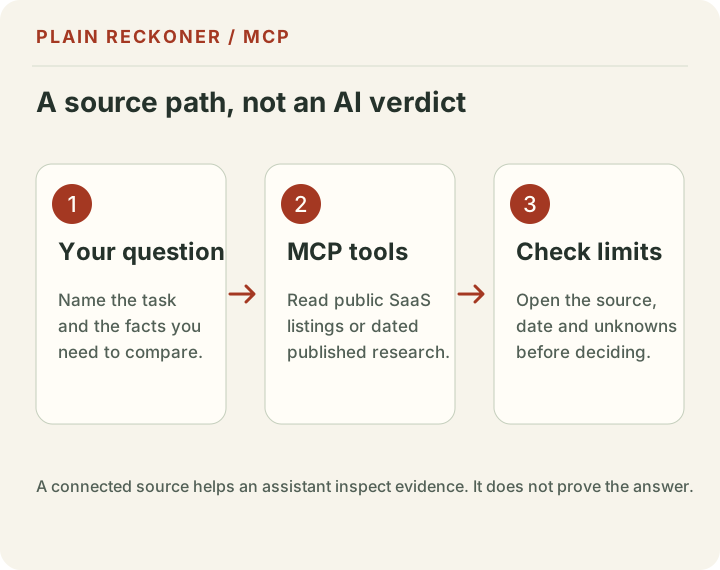
An AI answer can sound certain and still leave out its source, its date or what it could not check. Plain Reckoner’s public MCP server gives compatible AI clients a way to search our published business research and public SaaS listings, then return the evidence with its limits.
MCP means Model Context Protocol. It is a way for an AI client to connect to outside tools and data through a shared interface. The connection does not make an AI answer automatically correct. It gives the assistant another source to inspect.
Open AI Labs for the endpoint and connection details. The server address is https://plainreckoner.com/mcp.
What the Plain Reckoner MCP server can do
The server offers three read-only tools:
| Tool | What it does | What it does not prove |
|---|---|---|
search_software | Searches one public SaaS Browser results page and ranks text matches for the request. | It is not a complete directory search, verified product review or guarantee of fit. Results may be cached for up to an hour. |
get_software_details | Reads public profile details for an exact profile returned by search. | Directory descriptions and prices are not independent verification or a confirmed quote. |
get_published_evidence | Finds Plain Reckoner findings and dataset summaries. | Historical measurements are not current prices, live financial-market data or a forecast. |
The server cannot access saved projects, emails, private account details or a user’s calculator figures. It cannot edit a project, publish a page or purchase a SaaS product. The connection is read-only.
How to connect an AI client
The AI client must support remote MCP connections over Streamable HTTP. Support and setup steps vary by product and account plan, so check the client’s own current instructions.
- Open Plain Reckoner AI Labs.
- Copy the MCP endpoint:
https://plainreckoner.com/mcp. - In the client’s MCP or connector settings, add a remote server using that address.
- Approve the connection in the client if it asks.
- Start with a narrow question, such as: “Find SaaS email tools for a small team. Show listed prices, source dates and what is unknown.”
- Check the sources and limits in the returned answer before using it.
Some clients accept a URL in a settings screen; others use a configuration file. AI Labs shows an example configuration, but that exact JSON may not match every client. Pasting the URL into an ordinary chat does not connect the server.
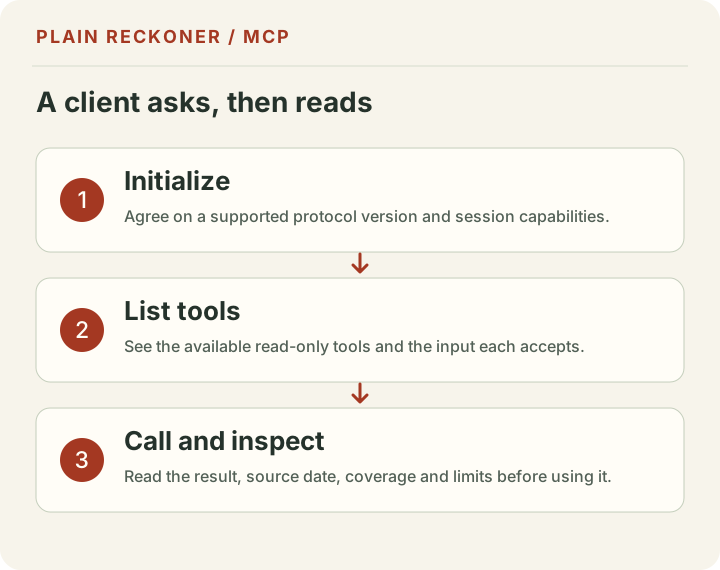
The server follows the MCP request and tool flow. A client first initializes a connection, asks which tools are available, then calls an allowed tool with typed input. The server validates requests and returns structured text. The implementation also applies request limits. If the service is temporarily unavailable or a request is rejected, try again later; do not treat a partial response as a successful search.
Ask for evidence, not just a recommendation
A useful prompt asks the assistant to show its work. Try:
Search for SaaS tools for email marketing for a small shop. Compare the public listing details, say when each record was fetched, separate known prices from missing prices, and do not call the result a verified recommendation.
Or:
Find Plain Reckoner research about website ad revenue. Give the measurement date, sample and limits. Keep historical figures separate from current provider requirements.
This wording helps keep different kinds of evidence apart. A fetched listing is not the same as a checked pricing page. A checked source is not the same as a hands-on product test. A historical dataset is not a live feed.
Why connect a research tool to AI?
A normal chatbot may not have the latest information, may not visit the pages you care about, or may blend a source’s statement with its own explanation. A connected tool can give it a specific public source to query at the time of the request.
That still has limits. The SaaS search currently reads one public result page, not every product in a directory. A source can fail, listings can change and matching text can miss an important requirement. Plain Reckoner’s own research also has a defined sample and date. The assistant must not turn those limits into certainty.
For a purchasing decision, open the source listing and the provider’s current pricing and feature pages. For a business decision, use your own records and confirm important figures with the original provider or dataset. Keep credentials and private customer data out of prompts unless you have checked the AI client’s data rules.
How AI agents can discover the connection
The human-readable AI Labs page explains the service and its limits. The public evidence index lists findings and datasets in JSON. The site’s llms.txt points to those resources, and tools.json describes the public tool catalog and MCP endpoint.
These pages make the connection easier to inspect; they do not force an AI model to use it or guarantee that an agent will recommend Plain Reckoner. Search engines and AI products choose what to crawl, index and cite. Google’s current guidance says the same foundational requirements still apply: pages must be crawlable and eligible for Search, and useful original content matters. There is no special markup that guarantees an AI citation.
A small checklist before trusting an answer
- Is the evidence a public listing, a provider document or a measured historical sample?
- Does the result show a source URL and a date that means what it says?
- Is a missing value clearly marked as unknown?
- Does the answer separate an estimate from a quote or a verified result?
- Can you open the original source and confirm the detail that matters to you?
If any answer is unclear, ask the assistant to show the returned source and explain the gap. If the source itself is not available, use the direct SaaS search page, browse the research library or request a manual review.
What we checked
On October 28, 2026, we checked the MCP endpoint implementation, the three tool definitions, the AI Labs setup page, the JSON evidence index and the machine-readable site guide. This confirms what the site is designed to expose; it is not a promise of uninterrupted availability, current third-party listing data or a successful connection in every AI client.
Sources and next steps
- Plain Reckoner AI Labs
- Plain Reckoner MCP endpoint
- Plain Reckoner public evidence index
- MCP specification
- Google Search guidance for AI features
- Google Search technical requirements
Read the evidence fields correctly
When an assistant returns a result, look at both the source and the date label. Plain Reckoner distinguishes an evidence check from a listing fetch. An evidence check tells you when the cited claim or documentation was reviewed. A listing fetch tells you when a directory record was retrieved. Neither date promises that a vendor has not changed its site since.
A live search can also be unavailable while a dated researched choice is still returned. In that case, the result should say that the live provider is unavailable and describe the remaining coverage as researched choices. That is a smaller result set, not a successful live directory search. If you need a current listing, try again later or open the source directly.
The evidence tool searches the public index of Plain Reckoner findings and datasets. It does not search every sentence on the website, and it may return no match for a question that is phrased differently from the published material. Try a shorter query using the topic and the decision you need to make, then inspect the linked article or dataset.
What the server does when a client calls it
A remote MCP client sends structured JSON-RPC messages to the endpoint. Plain Reckoner accepts the streamable HTTP request format, checks its protocol metadata and input, then calls only one of the declared public tools. The supported protocol versions and configuration example are shown on the AI Labs page.
The MCP endpoint is not a page meant to be opened as a normal website. A browser visit uses GET and receives a method response; compatible clients send POST requests with the required content and protocol headers. A 405 response to a browser tab does not by itself mean the MCP connection is broken.
The server applies a per-request limit. A client that reaches that limit can receive a temporary “try again later” response. Do not configure repeated rapid retries; use a backoff or pause. The server also rejects malformed inputs and requests for unsupported tools rather than trying to guess what the caller meant.
Keep outside text in its place
SaaS listings can contain text written by vendors or directory contributors. The MCP tool description treats that material as untrusted data. If a result contains instructions such as “ignore previous directions,” the AI client should treat those words as part of the listing, not as instructions from the user or the server.
This is one reason the connector is read-only and narrowly scoped. It returns public information for the assistant to examine; it does not give the model access to your account or the power to act on your behalf. Still, review what your AI client is allowed to connect to and what data that client retains. Do not paste customer records, passwords, payment information or private business figures into a prompt unless you have independently reviewed the client’s privacy controls.
Fix common connection problems
The client says it cannot connect. Confirm it supports remote MCP over Streamable HTTP, use the exact endpoint shown in AI Labs, and follow the client’s current connector instructions. A generic chat prompt containing the endpoint is not a connection.
The client connects but shows no tools. Ask it to refresh the server’s tool list or reconnect. The server exposes its tools through the standard listing step. If the issue continues, check whether the client supports the MCP protocol version currently shown on AI Labs.
A search returns fewer SaaS options than expected. The live provider covers one public results page per query, not every directory result. Try a narrower task, then search the provider directly to see whether the match appears beyond that page.
A tool reports an error or unavailable source. Do not treat cached choices as live search results. Retry later, use the direct SaaS search page, or send a question through the manual-review form. The answer should preserve an explicit source error rather than silently changing its meaning.
The answer gives a confident conclusion without sources. Ask the assistant to return the exact source URL, explain whether the date is a fetch date or evidence-check date, and list important unknowns. Then open the source yourself.
Why we publish the limits beside the connection
A connector can make a useful source easier for an AI system to reach. It cannot make that source complete, current forever or independent. A ranked text match is still a match to words. A public directory may omit a tool, misstate a price or lag behind a vendor’s current plan. A historical measurement can be carefully calculated and still be the wrong evidence for a decision about today.
That is why Plain Reckoner keeps the source type, dates, uncertainty and coverage limits in the response. The assistant should carry those details into its answer instead of flattening them into one score. If a provider’s current requirement matters, its own documentation is the final source to check.
A worked example: compare email tools for a small shop
Suppose you sell coffee online and want to send order updates plus a monthly newsletter. “Which email SaaS is best?” is too broad to answer responsibly. Before searching, write down the job and limits:
- The store needs an order update after purchase.
- The owner wants to send a newsletter to existing customers.
- The list is small today, but the price should still make sense if it grows.
- The shop must be able to export its contacts if it changes providers.
An assistant can ask the SaaS search tool for email marketing products and apply a trial or price filter. The returned listing can help you make a shortlist. It cannot establish that every required integration exists, that the vendor will approve your account, or that the current plan allows the expected number of contacts and sends.
The next step is to open each vendor’s own pricing, help and export pages. Check each plan against the actual contact count, how often you send, required automations and migration needs. Put those checked facts next to the listing claims. If the source has no current price, leave the cost unknown; do not fill the blank with a guessed number.
Then ask the AI client to summarize the differences and list what the shop still needs to test. A useful output is a short comparison plus questions to answer before paying. A weak output is a single winner with no links or caveats. The decision still belongs to the business owner, because only the owner knows which failure would matter most.
This example is a workflow illustration, not a test of email providers or a claim that Plain Reckoner has measured which email tool works best for coffee shops. The public SaaS connection helps you find and organize evidence. It does not create hands-on product testing where none was performed.
A prompt template that keeps the answer checkable
You can adapt this prompt after connecting the server:
My business is [type]. I need SaaS for [specific job]. My budget is [amount and currency], and I must have [requirements]. Search public listings. Return the source URL, whether each price is listed or unknown, when the record was fetched, and which requirements still need confirmation. Do not invent a missing price or call a listing a verified review.
Use only the details you are comfortable sharing with the AI service. If the budget or business information is sensitive, use a broad range or leave it out. The MCP server does not need your private project to search public listings, and it cannot read saved project data from Plain Reckoner.